Frontend Web Development -Basics(Part 1)
What is Frontend Web Development ?
Frontend is a face of any website, that is what ever you see on a website like buttons, icons, images, text, and lot more. A Frontend Developer is someone who creates websites and web applications. It is, also known as client-side development is the practice of producing HTML, CSS and JavaScript for a website or Web Application so that a user can see and interact with them directly. So if want to become a frontend developer, you must know HTML, CSS, and JavaScript which is a basic requirement for frontend development. I will be sharing some of the resources that might be helpful for better understanding.
Hyper Text Markup Language (HTML)
HTML stands for Hyper Text Markup Language, which is the most widely used language on Web to develop web pages. HTML is like a skeleton of webpage, as it gives basic outline of the webpage. Look at the code given below:
<!DOCTYPE html> /* declaration defines that this document is an HTML5
                document */
<html>
    <head>
<title> Content written here will be visible in browser's title bar or in the
page's tab </title>
        </head>
  <body>
          <h1> This is LARGE heading </h1>
          <p> This is paragraph </p>
    </body>
</html>
<html> /* HTML Root Element */
<body> /* Hold Content for HTML */
So for writing HTML code a simple text editor is all you need, you can go with Notepad or VS Code for writing code. I would recommend to use VS Code editor.
HTML Element
An HTML element is defined by a start tag, some content, and an end tag. Some of the HTML Elements have no content for example <br> and these elements are known as empty elements and they do not have closing tag.
/* <h1> to <h6> are all heading tags */
<tag-name> Content </tag-name>
/* Examples */
<h1> Heading tag </h1>
<p> Paragraph tag </p>
<a href="#"> Link Tag </a>
HTML is Not Case Sensitive
HTML tags are not case sensitive <A> is same as <a>. But it is always recommended to use lowercase letters. The HTML standard does not require lowercase attribute names.
HTML Attributes
Some of the HTML elements have attributes. Now what do we mean by Attributes, Attribute is an additional information about elements. For examples <a> tag have href attribute that specifies the URL of the page the link goes to.
The <img> tag have src attribute that specifies the path to the image to be displayed, height attribute specifies height of image in pixels, width attribute specifies width of image in pixels and alt attribute which specifies an alternate text for an image, if the image for some reason cannot be displayed. This can be due to slow internet connection, or an error in the src attribute, or it can be the user uses a screen reader. Refer the below example of code:
<a href="https://www.youtube.com/">Youtube</a>
<img src="abc.jpg" height="100" width="100" alt="abc-photo"> /* It does not require closing tag */
Heading in HTML:
HTML headings are defined with the <h1> to <h6> tags. <h1> defines the most important heading. <h6> defines the least important heading. Refer the below code:
<h1>Heading 1</h1>
<h2>Heading 2</h2>
<h3>Heading 3</h3>
<h4>Heading 4</h4>
<h5>Heading 5</h5>
<h6>Heading 6</h6>
Output:
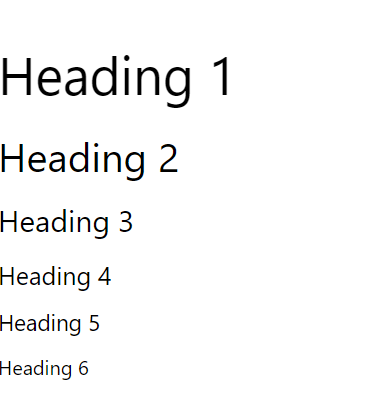
Why Heading is important ? Search engines uses the headings to index the structure and content of your web pages. Users often skim a page by its headings. It is important to use headings to show the document structure.
So, That is the end for Frontend Web Development -Basics(Part 1). I will be continuing after this in the upcoming parts. Thank You !